Lightweight mobile slots in Kenya conserve cellular data via local asset caching, but visual performance toggles never alter server-side RNG or RTP. When network latency causes screen freezes, repeated tapping queues unintended bets.
Navigating mobile casino slots across Nairobi, Mombasa, or rural regions often means dealing with fluctuating 3G/4G connections on Safaricom or Airtel networks. While lightweight HTML5 architecture drastically cuts initial load times and conserves mobile data bundles, game speed never alters the underlying mathematical house edge. Understanding the distinction between local device rendering and remote server calculations is essential for maintaining control over both your data usage and your bankroll.
Technical Architecture: Client Rendering vs. Server-Side RNG
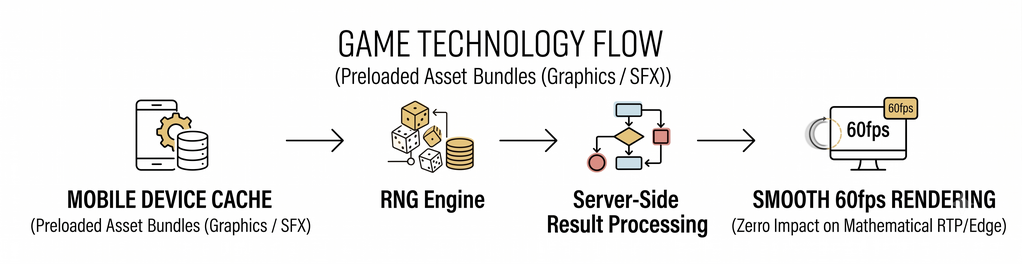
A common misconception among mobile players is that smoother reel animations indicate higher win rates or altered payout frequencies. In modern mobile iGaming architecture, your smartphone functions strictly as a visual display terminal.
Client-Side Visuals (Your Device): Preloads lightweight graphics, compressed audio sprites, and interface layouts into your mobile browser’s temporary cache (WebView / Chrome). Enabling "Battery Saver" or "Low Graphics" modes reduces GPU strain and data usage, maintaining stable frame rates on entry-level Android devices (such as Tecno, Infinix, or Samsung Galaxy A-series).
Server-Side Probability (The Game Server): Every spin outcome is generated the millisecond your request registers on the certified game server via a Random Number Generator (RNG). Return to Player (RTP) percentages, hit frequencies, and volatility remain fixed regardless of connection speed, screen resolution, or device hardware.
Low-Data Mobile Slot Benchmark for Kenyan Cellular Networks
To identify titles engineered for low-bandwidth cellular environments, games must be evaluated across initial payload transfer, per-spin data consumption, and the availability of manual graphic throttles.
| Game Title | Provider | Initial Load Payload (3G/4G) | Est. Data Usage (KB / Spin) | Built-In Data Saver Toggle | Published RTP | Volatility Profile |
| Aviator | Spribe | ~1.2 MB | 8 – 15 KB | Yes (Static Elements) | 97.00% | Medium |
| Fire Strike | Pragmatic Play | ~3.8 MB | 18 – 30 KB | Yes (Battery Saver Mode) | 96.50% | Medium-High |
| 888 Gold | Pragmatic Play | ~1.8 MB | 10 – 20 KB | Yes (Reduced Animations) | 97.52% | Medium |
| Sweet Bonanza | Pragmatic Play | ~6.5 MB | 45 – 75 KB | Yes (Disable Ambient FX) | 96.48% | High |
| Mega Moolah | Games Global | ~5.2 MB | 35 – 60 KB | Limited (Audio Only) | 88.12% + Progressive | High |
Note: Data consumption figures represent averages recorded during continuous cellular testing on Safaricom 4G and Airtel 3G network profiles. Real-world consumption may vary slightly based on browser cache persistence.
The Latency Trap: Navigating Network Delay and Accidental Multi-Spins
When mobile signal drops from 4G to EDGE during a spin, the visual display on your phone may freeze or fail to register the spin animation immediately. This creates a psychological hazard known as the Double-Tap Trap.
Technical Safeguard Warning: Tapping the spin button repeatedly during a screen freeze does not force the server to recalculate. Once your initial bet request reaches the server, the spin is finalized. Spamming the button queues up subsequent wagers the moment your data connection restores, leading to rapid, unintended balance depletion.
The 3-Tier Network Resilience Framework
Local Pre-Flight (Asset Verification): Launch the game in official demo mode on cellular data. Check whether assets fully load within 4 seconds without forcing browser refreshes.
Settings Configuration: Open the in-game settings panel immediately. Toggle Battery Saver, Quick Spin, or Disable High-Definition Audio to compress per-spin data packets.
Connection Failure Protocol: If an active spin freezes mid-round, do not tap repeatedly. Wait 10 seconds or refresh the browser. Check your account transaction log: the server-side result will already be logged with winnings credited automatically.
Is a High-Efficiency Mobile Slot Right for You?
Who It Suits
Data-Conscious Mobile Players: Users managing daily or weekly Safaricom / Airtel data bundles who require sub-30 KB/spin consumption.
Entry-Level Smartphone Owners: Players on devices with 2GB–3GB RAM who experience thermal throttling or browser crashes on resource-heavy 3D video slots.
Discipline-Focused Operators: Players who prioritize instant interface response times to execute clear stop-loss and session-limit rules.
Who It Does Not Suit
Cinematic Experience Seekers: Players who prioritize immersive 3D cutscenes, dynamic orchestral audio, and complex particle effects over low latency.
Impulsive Action Tappers: Individuals prone to rapid, repetitive tapping when visual feedback stutters.
System Hunters: Anyone operating under the mistaken belief that switching graphic settings or choosing "fast" slots alters house odds or RNG distribution.
Actionable Decision Guide
Before staking real KES via mobile money on any fast-loading slot:
Step 1: Test the Demo Build: Visit the game developer's official website (e.g., Pragmatic Play, Spribe) or a licensed BCLB (Betting Control and Licensing Board) operator to launch the title in free demo mode over your mobile network.
Step 2: Inspect Menu Settings: Verify that the mobile interface allows you to disable ambient background animations and high-resolution sound packs.
Step 3: Establish Strict Session Limits: Fast-loading slots reduce cycle time between rounds. Set explicit balance caps and session timers to ensure the increased speed does not shorten your planned playtime.
Step 4: Verify M-Pesa API Stability: Ensure deposits are confirmed via official Paybill/Till channels with your balance updated before launching high-speed sessions.
Final Verification Checklist
Launched the title in official demo mode on your standard mobile connection to verify responsiveness.
Enabled built-in data saver or low-graphics toggles in the game settings menu.
Confirmed that the operator is licensed by the Betting Control and Licensing Board (BCLB) of Kenya.
Set strict, predetermined KES deposit limits and session time boundaries before active play.