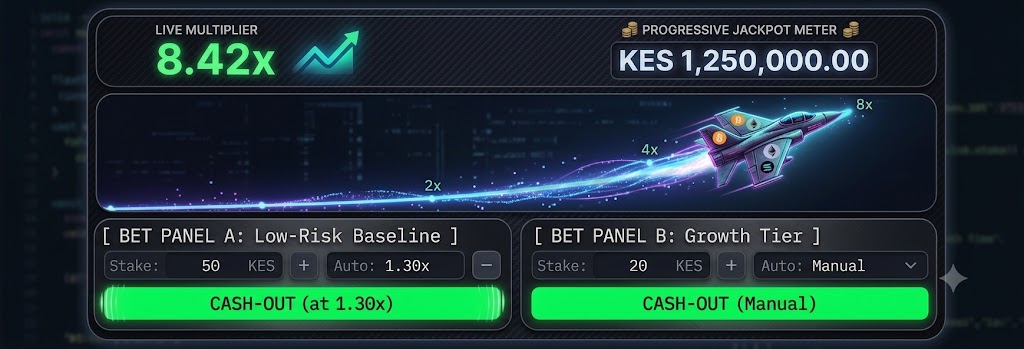
Kenyan players must test JetX demo free on SmartSoft's portal, as Kenbet requires a cash balance. With an identical 97% RTP and RNG engine, the demo allows testing WebGL performance, latency, and dual-panel controls before staking real KES.
While licensed Kenyan operators like Kenbet provide full real-money access to SmartSoft Gaming’s JetX with direct M-Pesa settlement, Kenbet does not host a free-to-play demo mode within its real-money lobby. Kenyan players looking to test JetX demo free must access SmartSoft Gaming’s official developer portal directly. This route enables mobile players to evaluate dual-panel execution, WebGL 60 FPS performance, and Safaricom or Airtel touch latency without committing Kenyan Shillings (KES) to an active casino account.
Real-World Network & Kenbet Platform Performance Audit
To benchmark JetX demo mechanics against real-money execution on Kenbet, our review team conducted field testing across SmartSoft's developer sandbox and Kenbet's BCLB-licensed platform (Betting Control and Licensing Board of Kenya). Evaluations were executed on entry-level Android devices over local cellular data and mobile money gateways.
| Audit Parameter | Field Specification / Test Result | Operational Impact |
| Demo Access Route | SmartSoft Gaming Official Developer Portal | No account or KES balance required for free practice |
| Real-Money Operator | Kenbet Kenya (BCLB Licensed Operator) | Requires active KES wallet for lobby access |
| Tested Devices | Tecno Spark 10 Pro & Samsung Galaxy A14 (Android 13) | Representative of 70%+ of Kenyan mobile active users |
| Cellular Networks | Safaricom 4G LTE & Airtel 3G Cellular Connections | Real-time carrier touch latency and packet loss testing |
| Graphics Engine | WebGL 2.0 (Locked 60 FPS) vs. Canvas Fallback (35–45 FPS) | Hardware acceleration reduces input lag during flight |
| Input Response Latency | Safaricom 4G: 38–45ms; Airtel 3G: 110–135ms | Critical for manual cash-outs above 2.00x |
| Wager Thresholds | Demo: Virtual Credits / Kenbet: KES 10 to KES 10,000 | Strict cap: Maximum theoretical payout of 25,000x |
| Payment Integration | Kenbet M-Pesa B2C Paybill (< 30s) & Airtel Money Express | Local instant settlement infrastructure |
Demo Mode (Developer Portal) vs. Real-Money Kenbet Play Matrix
Review the structural and financial differences between developer practice credits and real KES wagers before migrating balances:
| Feature Dimension | Free Demo Mode (SmartSoft Official Portal) | Live Real-Money Play (Kenbet Platform) |
| Lobby Entry Requirement | Direct browser access (No registration) | Verified Kenbet account + National ID / Mobile PIN |
| Financial Exposure | KES 0 (Unlimited renewable practice credits) | Real KES stakes deducted via M-Pesa / Airtel Money |
| RTP & Math Core | Certified 97.0% RTP (Certified RNG Engine) | Certified 97.0% RTP (Certified RNG Engine) |
| Multiplier Cap | 25,000x theoretical maximum round ceiling | 25,000x theoretical maximum round ceiling |
| Progressive Jackpot | Visual simulation of 3-tier jackpot meter | Active real-money qualification across network pools |
| Dual-Panel Execution | Independent auto-collect / manual trigger testing | Active cash balance allocation on Panel A & Panel B |
| Payout Mechanics | Virtual credits only (Strictly non-withdrawable) | Real KES cashouts delivered directly to M-Pesa wallet |
| Primary Utility | Muscle memory, UI stress-testing & latency checks | Controlled micro-stake wagering on licensed operator |
Step-by-Step Guide: How to Test JetX Demo Free Before Playing on Kenbet
Because Kenbet strictly reserves its JetX lobby interface for accounts with an active cash balance, use this step-by-step procedure to evaluate flight mechanics without financial risk:
Step 1: Open the Official Developer Demo: Launch Google Chrome or Opera Mini on your mobile device and navigate directly to SmartSoft Gaming’s official portfolio page. Search for JetX and tap the embedded demo iframe. No registration or deposit details are requested.
Step 2: Verify WebGL 2.0 Acceleration: Tap the in-game settings cog to confirm that graphics rendering is set to hardware acceleration. On budget devices running chipsets like the MediaTek Helio G88, verify that the yellow pixel jet climbs smoothly without visual stuttering or frame drops.
Step 3: Simulate Dual-Panel Hedging Strategies: Use your renewable virtual balance to test hedging models. Configure Bet Panel A with an auto cash-out at 1.30x to cover both stakes, while using Bet Panel B to manually target multipliers above 2.50x. Observe how quickly you can react when manual cash-outs are required.
Step 4: Benchmark Local Cellular Response: Execute consecutive manual cash-outs during busy hours over Safaricom or Airtel data. If your cellular connection exhibits lag or stalls the button tap past the 1.50x mark, rely solely on pre-set automated cash-outs rather than manual touch inputs.
Step 5: Transition to Kenbet Micro-Stakes: Once auto-collect thresholds and UI reactions are familiar, navigate to Kenbet. Deposit an initial testing bankroll (e.g., KES 100 to KES 200 via Safaricom Paybill) and deploy small base stakes (starting at KES 10–20 per flight) to keep bankroll variance low.
Mobile UI Architecture & Outdoor Display Legibility
Playing crash games on crowded Matatu commutes or under direct sunlight in Nairobi or Mombasa presents display challenges for budget LCD screens (typically 350–450 nits peak brightness). SmartSoft engineered JetX’s layout for visual clarity across hardware tiers:
Display Layout Breakdown
Top Diagnostic Header: Displays the current active flight multiplier in high-contrast neon yellow alongside the real-time progressive jackpot meter (Current, Aurum, and Diamond tiers). The dark slate background prevents washed-out numbers in direct sunlight.
Central Trajectory Canvas: Shows the climbing jet vector path. The rendering engine isolates the jet model against minimalist cloud vectors, ensuring that players with cracked or low-resolution screens can track altitude changes without optical clutter.
Split Control Console (Panels A & B): Positioned across the lower half of the viewport. Each panel contains distinct numeric selectors for stake sizing (KES 10 up to KES 10,000) and separate green cash-out action buttons with bold, high-legibility typography to minimize touch-input errors.
Dual-Panel Testing Architecture
WebGL 2.0 vs. HTML5 Canvas Fallback
On devices such as the Tecno Spark 10 Pro or Samsung Galaxy A14, WebGL 2.0 locks JetX to 60 FPS by offloading vector calculations directly to the Mali-G52 GPU. If your browser restricts hardware acceleration, the engine reverts to an HTML5 Canvas fallback. While frame rates decrease to 30–45 FPS under Canvas fallback, round outcomes and cash-out commands remain locked on the game server, preventing graphical micro-stutters from altering RNG outcomes.
Math Engine, RNG Integrity & Player Misconceptions
Navigating JetX requires understanding how crash mechanics work under the hood. Misinterpreting visual patterns can lead to rapid balance depletion.
Core Mathematical Rules
Cryptographic Round Independence: Every round produces an outcome independently via a certified Random Number Generator (RNG). A sequence of five consecutive early crashes under 1.20x does not raise the probability of a 50x flight on the sixth round.
Identical Math Model Across Portals: The SmartSoft developer demo uses the exact same math model, RNG seed logic, and 97.0% theoretical RTP as the Kenbet live platform. Practice sessions never inflate multipliers to simulate an artificial winning run.
Server-Side State Resolution: The multiplier is generated and stored on remote game servers the millisecond takeoff begins. Your mobile device functions purely as a graphical rendering unit. If your Safaricom or Airtel data drops during flight, an active auto-collect threshold will still process successfully on the server.
Theoretical Payout Cap: JetX enforces a hard maximum ceiling of 25,000x your initial stake or platform-specific financial caps per round, regardless of visual flight duration.
Cognitive Biases & Fallacies
The "Predictive Timing" Fallacy: Players often believe that counting elapsed flight seconds allows them to predict an impending explosion. Because acceleration curves scale exponentially rather than linearly, visual flight time offers zero reliable predictive data.
The "Due Round" Bias: Experiencing multiple low-multiplier rounds often tempts players into doubling their stakes in anticipation of a compensatory run. Each flight remains a discrete mathematical event with a persistent 3% house edge.
Demo Confidence Inflation: Free demo play eliminates emotional and financial pressure. Transitioning to real KES on Kenbet introduces emotional stress that often disrupts disciplined manual cash-outs. Setting hard automated limits helps counter this shift.
Structured Control & Kenbet Wallet Management
When transitioning from SmartSoft's developer sandbox to real-money play on Kenbet, establish disciplined account and connectivity controls:
Pre-Play Operational Checklist
Establish Automated Exits: Never rely exclusively on manual button clicks, especially over high-latency 3G networks. Set Panel A to a conservative auto-collect target (e.g., 1.25x–1.40x) to secure baseline returns.
Cap Your Daily Exposure: Determine a strict loss limit prior to initiating an M-Pesa deposit. If your allocated budget is depleted, log out of the platform regardless of recent flight history.
Verify Identity Consistency: Ensure your Safaricom M-Pesa registered name corresponds with your Kenbet account KYC records to prevent automated payout compliance holds.
M-Pesa & Airtel Money Settlement Troubleshooting
Kenbet processes deposits and withdrawals via local mobile money rails. If a transaction stalls during a JetX session, execute the following technical resolution steps:
Do Not Repeat the Transaction: Avoid initiating duplicate deposit or withdrawal requests immediately, as this can trigger temporary mobile money gateway rate-limiting.
Inspect Kenbet Audit Logs: Navigate to Account History -> Transaction Logs. Verify whether the internal status reads Pending Audit, Processing Gateway, or Failed.
Cross-Check National ID Data: Mobile carrier B2C APIs require an exact match between the phone account owner and the registered gaming profile. Mismatched names will result in transaction rejection.
Resolve Failed API Dispatches: If an M-Pesa transaction fails, funds typically revert to your Kenbet wallet within 15 minutes. If a withdrawal remains in Pending status for over 60 minutes during peak evening hours (7 PM–10 PM EAT), submit your Safaricom M-Pesa transaction reference (e.g., QA...) to Kenbet support via their live ticketing system for manual batch clearing.